• Technologies
  • AI Tips and Tricks
  • Frontend
  • Backend
  • Server
  • Contact
  • About
Friday, January 23, 2026
Adnan Halilovic Blog
  • Technologies
    • All
    • Angular
    • Git
    • JavaScript
    • ReactJS
    Angular 21: Why Native [class] is 2x Faster than ngClass!

    Angular 21: Why Native [class] is 2x Faster than ngClass!

    VS Code Setup for Angular Developers Featured Image

    Best VS Code Setup for Angular Development

    Mastering DevTools: Supercharge Your Workflow with Code Snippets!

    Mastering DevTools: Supercharge Your Workflow with Code Snippets!

    Quokka.js and Wallaby.js Giveaway

    Quokka.js and Wallaby.js Giveaway

    How to Work on Different Git Branches at the Same Time?

    How to Work on Different Git Branches at the Same Time?

    Lazyload Standalone Components in Angular

    Lazyloading Standalone Components in Angular

    Standalone Components Angular

    How to Create Standalone Components in Angular

    Private Routes in React Router V6

    Protecting Routes in React JS

    How to setup routing in ReactJS

    How to setup routing in ReactJS

  • AI Tips and Tricks
  • Frontend
  • Backend
  • Server
  • Contact
  • About
No Result
View All Result
  • Technologies
    • All
    • Angular
    • Git
    • JavaScript
    • ReactJS
    Angular 21: Why Native [class] is 2x Faster than ngClass!

    Angular 21: Why Native [class] is 2x Faster than ngClass!

    VS Code Setup for Angular Developers Featured Image

    Best VS Code Setup for Angular Development

    Mastering DevTools: Supercharge Your Workflow with Code Snippets!

    Mastering DevTools: Supercharge Your Workflow with Code Snippets!

    Quokka.js and Wallaby.js Giveaway

    Quokka.js and Wallaby.js Giveaway

    How to Work on Different Git Branches at the Same Time?

    How to Work on Different Git Branches at the Same Time?

    Lazyload Standalone Components in Angular

    Lazyloading Standalone Components in Angular

    Standalone Components Angular

    How to Create Standalone Components in Angular

    Private Routes in React Router V6

    Protecting Routes in React JS

    How to setup routing in ReactJS

    How to setup routing in ReactJS

  • AI Tips and Tricks
  • Frontend
  • Backend
  • Server
  • Contact
  • About
No Result
View All Result
Adnan Halilovic Blog
No Result
View All Result

How to Work on Different Git Branches at the Same Time?

Adnan Halilovic by Adnan Halilovic
December 4, 2022
in Git, Technologies
0
0
SHARES
501
VIEWS
Share on FacebookShare on Twitter
ADVERTISEMENT

Have you ever been in the middle of an important project when you had to switch to a different branch to fix something? Obviously, you had.

When we are making progress on one branch but need to switch to another, we usually commit or stash our modifications so that we may return to them later. Is it feasible, though, to just move to a different branch, without going through the procedures outlined above? Absolutely, that’s the case.

Both the video up top and the text below will walk you through the processes required to manage many branches simultaneously.

Git Worktree

Git Worktree allows us to take control of various working trees connected to the same repository.

You can check out numerous branches at once by using a git repository that now supports multiple working trees when created with git worktree.

– So, how to?

Add

# git worktree add will create a new worktree with a name of our choice

git worktree add name_of_our_branch

Once you’ve executed the mentioned command, you should see a new folder in your project’s directory matching the name we gave our workbranch. *See the screenshot below)

A newly created worktree appears in our project’s folder.

With this new folder in hand, we can launch an integrated development environment (IDE) window (I’ll be using Visual Studio Code, but any IDE would suit) and navigate into the worktree folder.

ADVERTISEMENT

Once you navigated to the folder, you can start working on the fix or anything that interrupted your work on the ‘important branch’. Commit your changes and push them to the main branch of your project and close the IDE.


List

Now, go back to your branch where you created the worktree and run the following command, to see a list of our worktrees.

# the following command lists all worktrees related to our repository
git worktree list

After running the list command you should see something like this in your terminal.

ADVERTISEMENT
List worktrees in our project

Remove

Now you can remove your worktree that we previously created by running the following command:

#Removes worktree - 
git worktree remove name_of_our_worktree

After running the command, we can see that the folder has been removed from our project. Also we can run git worktree list again to be sure that it has been removed.
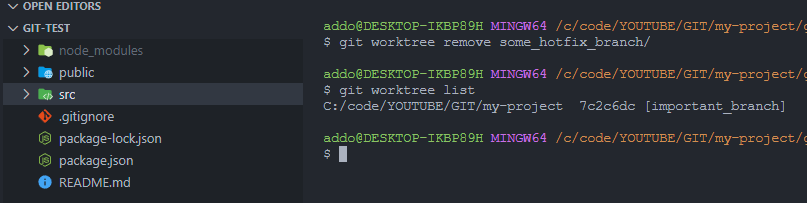
Remove a worktree from the project

Conclusion

By following the displayed instructions, we were able to add, list, and delete worktrees from our project. While you’re free to put your worktree wherever you choose, I find it most convenient to add it to the root folder of the project, where I’ll have access to all of the necessary node modules without having to reinstall them.

I hope the article was helpful.

Feel free to follow me for more content like this!

Source: Youtube - Adnan Halilovic
Tags: Git
ADVERTISEMENT
Previous Post

Lazyloading Standalone Components in Angular

Next Post

Quokka.js and Wallaby.js Giveaway

Related Posts

Angular 21: Why Native [class] is 2x Faster than ngClass!
Angular

Angular 21: Why Native [class] is 2x Faster than ngClass!

January 20, 2026
VS Code Setup for Angular Developers Featured Image
Angular

Best VS Code Setup for Angular Development

October 13, 2024
Mastering DevTools: Supercharge Your Workflow with Code Snippets!
Frontend

Mastering DevTools: Supercharge Your Workflow with Code Snippets!

September 24, 2023
Quokka.js and Wallaby.js Giveaway
Frontend

Quokka.js and Wallaby.js Giveaway

July 26, 2023
Lazyload Standalone Components in Angular
Angular

Lazyloading Standalone Components in Angular

September 11, 2022
Standalone Components Angular
Angular

How to Create Standalone Components in Angular

September 10, 2022
Next Post
Quokka.js and Wallaby.js Giveaway

Quokka.js and Wallaby.js Giveaway

Leave a Reply Cancel reply

Your email address will not be published. Required fields are marked *

Latest posts

Angular 21: Why Native [class] is 2x Faster than ngClass!
Angular

Angular 21: Why Native [class] is 2x Faster than ngClass!

by Adnan Halilovic
January 20, 2026
0

Why is the native class 2 or more times faster than the traditional ngClass? Before we dive into the technical...

Read moreDetails
Windsurf SWE-1 Featured Image

Windsurf SWE-1: A Groundbreaking Frontier Model Family for Engineers

May 20, 2025
AI Coding Competition Featured Image

LM Arena: The Ultimate Playground for Web Developers to Benchmark AI Language Models

May 20, 2025
TRAE: A Free AI-Powered Code Editor Built by TikTok’s Parent Company

TRAE: A Free AI-Powered Code Editor Built by TikTok’s Parent Company

May 20, 2025
The One MCP Server Every Developer Should Be Using

The One MCP Server Every Developer Should Be Using

May 13, 2025
Github LinkedIn Youtube Twitter Pinterest Instagram Reddit

About Me

Adnan Halilovic Blog

Adnan Halilović

Software Developer - Content Writer

I am Adnan Halilović, the man behind the website and channels that you are currently reading and viewing!

I am a software developer with over 15 years of expertise in a variety of fields.

Newsletter

Country:

Email address:


Recent from Instagram

    The Instagram Access Token is expired, Go to the Customizer > JNews : Social, Like & View > Instagram Feed Setting, to refresh it.

© 2022 Adnan Halilovic - Software development content, tips & tricks.

Click to Copy
No Result
View All Result
  • Technologies
  • AI Tips and Tricks
  • Frontend
  • Backend
  • Server
  • Contact
  • About

© 2022 Adnan Halilovic - Software development content, tips & tricks.